
A speaker’s fee automation software raised its prices by 500%. Here’s how I replaced it in an afternoon using Claude — and what it taught me about Human-First AI.
The Fee Increase
For years, I used a piece of software to handle invoicing for my speaking business — tracking speaking fees, expense caps, and generating the invoices I send clients after a keynote or workshop.
Then the vendor raised their price. Not a small bump. Five times what I was paying before. No new features. No explanation. Just: pay 5x now, or leave.
To be fair, the software had more capability than I was actually using — don’t they all? But for what I needed it for — creating an invoice — it still took real manual effort every time. There was even a separate Excel sheet running in the background just to get the final numbers right before I could type them into the invoice.
At the original price, that was annoying but tolerable. At five times the price, it was a dealbreaker.
The Idea
Around that time, I remembered a conversation with my friend Jennifer Beddell. She’d mentioned she uses Claude to create her invoices — all her rules programmed in, so all she has to do is scan a receipt and go.
I thought: I’ll give that a try.
The Build
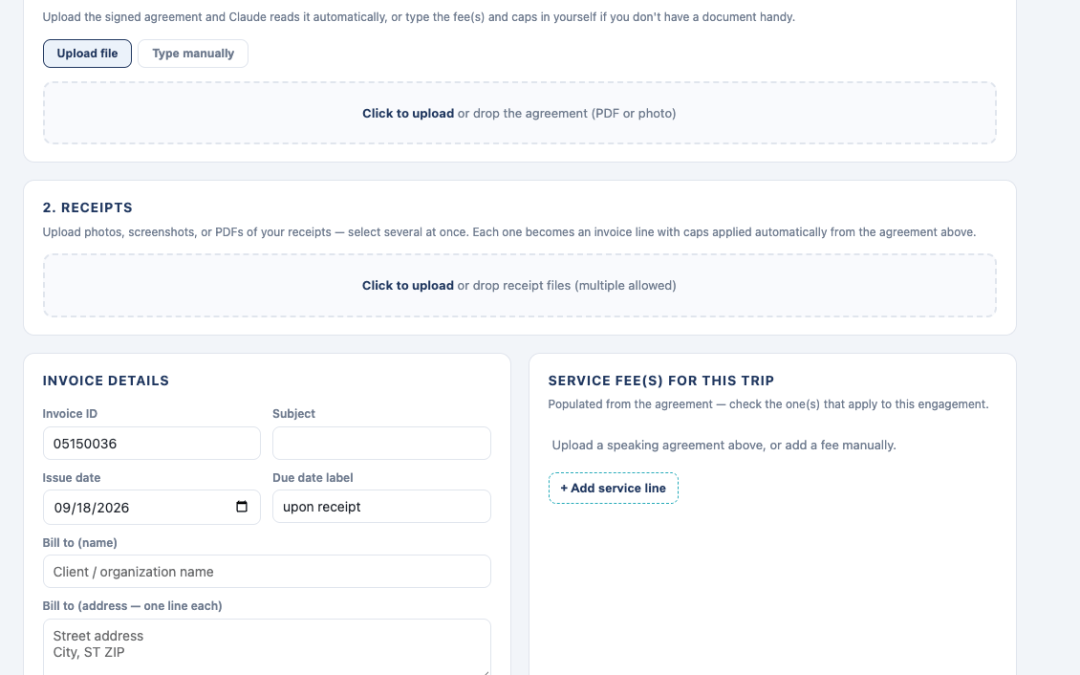
Within two hours, I had Claude code up my entire invoice process as a simple HTML tool that runs right on my computer. No subscription, no server, no vendor.
I gave it a handful of rules to work from — things like optional expense caps and mileage calculations. Nothing exotic. The tool now does three things:
- Reads my speaking agreement (uploaded or pasted in) to pull out the fee and terms
- Reads receipts I scan in from a trip — airfare, meals, parking — and checks them against my expense caps automatically
- Generates a finished, client-ready invoice as a PDF that matches the template I’ve used for years
Total cost to build it: about $20, one month of Claude.
It wasn’t one clean request that did it all, though. There was a lot of back-and-forth to get everything working the way I wanted. And, predictably, the further I got, the more “hey, it’d be cool if it could also do this” ideas I had.
I did stop myself at one point, though. I didn’t have it build a full expense spreadsheet — I already have a VP of Accounting for that. (She’s also my wife.)
The Result
Now, after every trip, I scan my receipts into the tool, feed it the speaking agreement, and watch it spit out a finished invoice in my own template. It runs entirely on my computer. No subscription. No vendor. No surprise fee increase waiting for me next year.
Here’s the part that surprised me: it’s not just cheaper. It’s faster and takes less manual effort than the system I replaced ever did.
I talk a lot on stage about AI saving people time. This is the first time it clearly saved me both time and money.
Your Turn
This is a small example, but it’s exactly the kind of thing I mean when I talk about Human-First AI — using AI where it genuinely helps, in a way that fits how you already work, without needing a computer science degree to pull it off.
So here’s my question for you: where are you bleeding time or money right now that AI could quietly fix?
If you want to see what that looks like for your team — not hype, not buzzwords, just practical AI that actually gets used — that’s the whole point of my Human-First AI keynote and workshop. [Let’s talk.]
Want this as a Word doc, or good to paste straight into your blog CMS?